
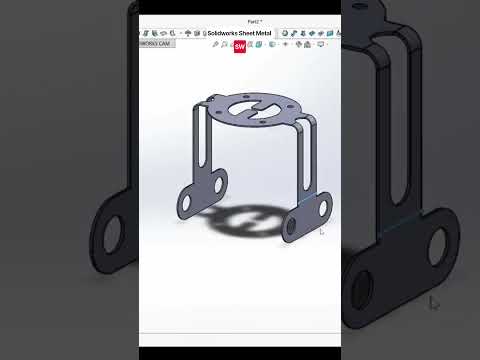
When designing complex, multi-directional components, traditional 2D sketching can sometimes feel limiting. Creating multiple reference planes just to draw a single frame or bent sheet metal part takes unnecessary time. That is where mastering the SolidWorks 3D sketch capability becomes a total game-changer for CAD designers and engineers.
In this guide, we will explore how utilizing a 3D sketch environment can streamline your sheet metal modeling workflow and elevate your 3D CAD skills.
Why Use 3D Sketching for Sheet Metal?
Standard 2D sketches constrain your geometry to a single flat plane (such as Front, Top, or Right). However, real-world sheet metal enclosures, brackets, and structural frames often extend across multiple spatial axes. By sketching in three dimensions, you can draft wireframe geometry freely across X, Y, and Z space simultaneously.
This approach eliminates the clutter of dozens of reference planes, allowing you to build complex sheet metal sweep paths, lofted bends, and structural members in a fraction of the time.
Key Steps to Master 3D Sketching
Getting comfortable with 3D sketching requires understanding a few fundamental controls:
- Activate the Tool: Navigate to the Sketch tab on the CommandManager, click the drop-down arrow under "Sketch," and select 3D Sketch.
- Master the Tab Key: The secret to successful 3D sketching is switching coordinate planes on the fly. Pressing the Tab key toggles your drawing orientation between the XY, YZ, and ZX planes seamlessly.
- Add Relations and Dimensions: Just like in 2D sketching, fully defining your geometry is critical. Apply geometric relations such as "Along X," "Along Y," or "Along Z" to align your lines properly with the main coordinate axes.
Turning Your Sketch into a Sheet Metal Model
Once your SolidWorks 3D sketch skeleton is complete, you can easily convert it into fully functional sheet metal features. Tools like Swept Flange, Lofted-Bend, or Routing allow you to turn line paths into realistic sheet metal components complete with defined bend radii, k-factors, and material thicknesses.
Final Thoughts
Learning to navigate space without relying on static reference planes opens up endless possibilities for complex sheet metal and structural design. Start experimenting with a SolidWorks 3D sketch in your next design project to make your modeling process faster, cleaner, and much more efficient!


