
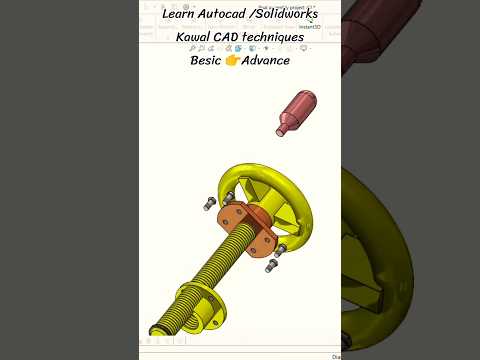
In the fast-paced world of mechanical engineering and product design, clear visual communication is essential. While static 2D drawings still hold value, dynamic 3D visual models have revolutionized how engineers present, analyze, and refine their concepts. Creating a detailed SolidWorks 3D assembly animation paired with an exploded view offers an unprecedented look into complex mechanical systems.
The Importance of Exploded Views in Mechanical Design
An exploded view is a diagram or animation that shows the individual components of an object separated, yet positioned to show how they fit together. When applied to mechanical systems, exploded views serve several critical purposes:
- Enhanced Clarity: They make intricate internal components immediately visible without losing the context of the complete mechanism.
- Streamlined Assembly Lines: Manufacturing teams can easily understand the exact sequence required for building or servicing a machine.
- Error Detection: Visualizing how components interact in 3D helps designers catch clearance issues, interference, or logical assembly errors long before physical production begins.
How Animation Elevates CAD Presentations
While a static exploded view provides crucial spatial context, adding motion takes design presentation to the next level. Animating a SolidWorks 3D assembly transforms static CAD geometry into a realistic simulation of mechanical movement.
By using motion studies and keyframe animations, engineers can demonstrate real-world functionality—showing gear meshes, linear actuators, and pivoting links in action. Smooth transitions between the fully assembled state and the exploded state allow stakeholders, clients, and technical teams to grasp complex spatial relationships effortlessly.
Best Practices for Building Dynamic 3D Assemblies
To achieve professional-grade animations and exploded views, consider the following technical tips:
- Maintain Proper Mates: Ensure all mates and constraints accurately represent real-world physical boundaries to prevent erratic behavior during motion studies.
- Organize Sub-Assemblies: Group related components logically in the feature tree. This makes step-by-step exploded steps much cleaner and easier to animate.
- Optimize Rendering and Lighting: Use realistic material appearances, proper lighting setups, and smooth camera transitions to give your animation a polished, professional look.
Whether you are an engineering student, a professional designer, or a CAD enthusiast, mastering the SolidWorks 3D assembly workflow is one of the most effective ways to showcase your technical skills and bring your mechanical ideas to life.


