
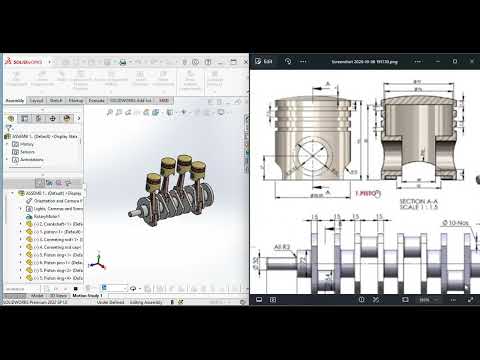
Whether you are a student beginning your journey in mechanical engineering or a professional looking to sharpen your CAD skills, mastering the complexities of internal combustion engines is a significant milestone. In the latest tutorial from CAD With Francis, we dive deep into a practical 4-cylinder engine drawing exercise, providing you with the tools to excel in modern design.
The Power of Practical CAD Training
Understanding how individual components interact within a complex machine is vital for any designer. This exercise focuses on a SolidWorks assembly of a 4-cylinder engine, a project that bridges the gap between theoretical engineering drawings and functional 3D models. By following this guide, you move beyond simple part creation and begin to understand the synergy of mechanical systems.
Key Components of the Engine Assembly
A 4-cylinder engine is composed of several moving parts that must fit together with precision. During this exercise, you will work with: * The Crankshaft: The backbone of the engine's motion. * Pistons and Connecting Rods: Understanding the reciprocating motion. * The Engine Block: The structural housing for all internal parts.
The primary goal of this SolidWorks assembly is to ensure that all mates—the digital constraints that mimic physical connections—are applied correctly. This ensures that the pistons move smoothly within the cylinders and the crankshaft rotates without interference.
Why Focus on SolidWorks Assembly?
In the professional world, design is rarely about a single part. It is about how those parts function as a whole. Developing a high-quality SolidWorks assembly allows engineers to perform interference checks, motion analysis, and stress tests before a single physical prototype is ever built. This tutorial simplifies these complex processes, making them accessible and easy to follow.
Elevate Your Engineering Skills
CAD With Francis is dedicated to teaching Engineering Drawing and SolidWorks in a simple, practical manner. By completing this 4-cylinder engine exercise, you aren't just drawing lines on a screen; you are building the foundation for a career in mechanical design and manufacturing.
Ready to get started? Grab your dimensions, open your software, and let’s bring this engine to life through the power of 3D modeling.


