
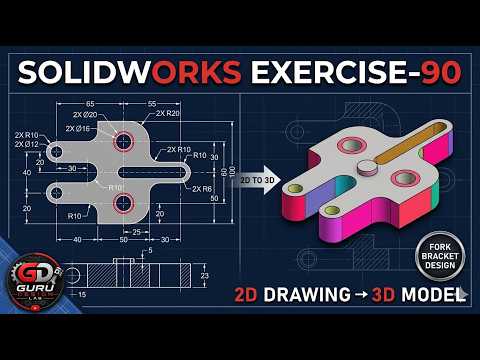
Welcome to Guru Design LAB! If you are looking to elevate your CAD modeling skills, learning how to efficiently convert complex 2D technical drawings into accurate 3D models is an essential step. In SOLIDWORKS Exercise 90, we focus on constructing a robust Fork Bracket design from scratch. Learning how to leverage a SolidWorks 3D sketch alongside traditional 2D features can streamline your design process and significantly boost your workflow.
Understanding the 2D Drawing to 3D Workflow
Transitioning from a 2D orthographic drawing to a parametric 3D model requires a structured design strategy. Before creating features, you must carefully analyze the dimensions, symmetry, and geometric relationships outlined in the blueprint.
Incorporating a SolidWorks 3D sketch into your initial modeling strategy allows you to define spatial dimensions, centerlines, and sweep paths without being restricted to a single flat plane. This spatial versatility is especially valuable when working on mechanical brackets, structural frames, and complex components requiring multi-axis alignments.
Key Steps in Designing the Fork Bracket
To build the Fork Bracket efficiently in SOLIDWORKS, consider the following step-by-step approach:
- Blueprint Analysis: Study the 2D engineering drawing to identify primary base features, secondary cuts, and critical reference dimensions.
- Base Feature Creation: Start by sketching the primary profile on standard reference planes (Front, Top, or Right) and extrude the main body of the bracket.
- Utilize 3D Geometry: Incorporate a SolidWorks 3D sketch to route centerlines, guide curves, or hole locations across multiple planes with precision.
- Detailing and Refinement: Use Extruded Cuts, Fillets, and Chamfers to form the fork arms, mounting holes, and rounded structural edges.
Conclusion
Translating 2D technical drawings into 3D parametric models is a foundational skill for any mechanical designer. By mastering 3D sketching techniques and organized feature creation, you can tackle complex CAD projects with confidence. Be sure to check out the full step-by-step video tutorial by Guru Design LAB to follow along and refine your SOLIDWORKS skills today!


