
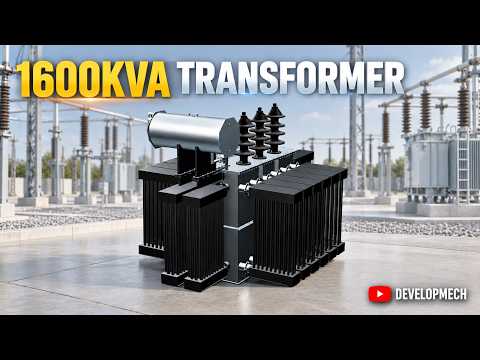
In the world of electrical engineering and industrial manufacturing, precision is the difference between a high-performing asset and a costly failure. Designing a 1600 kVA transformer requires more than just technical knowledge; it demands the right tools to visualize complex structures and ensure structural integrity. This article explores the intricate process of taking a high-capacity transformer from initial engineering calculations to a fully realized 3D assembly.
The Foundation: Engineering Calculations and Analysis
Before a single line is drawn in a CAD environment, rigorous engineering calculations must be performed. For a 1600 kVA transformer, designers must account for thermal dissipation, magnetic flux, and the physical stresses placed on the enclosure. These calculations dictate the thickness of the materials used and the specific dimensions required to house the core and windings safely. Accurate analysis at this stage ensures that the final product will meet international safety and performance standards.
Precision Design with SolidWorks 3D Sheet Metal
Once the technical specifications are finalized, the focus shifts to the physical enclosure. This is where SolidWorks 3D sheet metal tools become indispensable. Designing the tank and cooling fins of a transformer involves complex bends, precise flange placements, and intricate cutouts for bushings and connectors.
By utilizing SolidWorks 3D sheet metal workflows, engineers can create accurate flat patterns that are ready for laser cutting and CNC folding. The software allows for real-time adjustments to bend allowances and material gauges, ensuring that every component fits perfectly during the fabrication process. This level of detail reduces material waste and streamlines the manufacturing cycle.
From 3D Modeling to Assembly Animation
The final phase of the design process is the assembly. Integrating the internal electrical components with the external sheet metal housing requires a high degree of spatial awareness. A 3D assembly animation serves as a powerful tool for both quality control and client presentations.
By simulating the assembly process, designers can identify potential interference issues or clearance problems before the first piece of metal is ever cut. Integrating SolidWorks 3D sheet metal parts into a comprehensive assembly animation provides a clear roadmap for the production team, ensuring that the transition from a digital concept to a physical 1600 kVA power transformer is seamless and efficient.
Whether you are an aspiring mechanical engineer or an industry professional, mastering these advanced design techniques is essential for modern industrial fabrication.


