
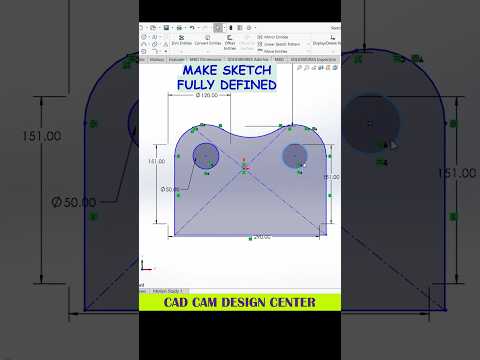
Whether you are an engineering student, an industrial designer, or a 3D printing enthusiast, mastering SolidWorks is crucial for bringing your creative concepts to life. While CAD design can sometimes feel overwhelming with its vast array of tools and menus, taking a focused approach can dramatically improve your modeling speed and accuracy. In this concise SolidWorks 3D tutorial, we will break down essential modeling tips that every designer should know to create clean, precise 3D parts.
Key Principles for Better 3D Sketching
Every great 3D model starts with a strong, well-defined 2D sketch. To ensure your design remains parametric and flexible for future changes, always aim to fully define your sketches using proper dimensions and geometric relations.
- Utilize Smart Dimensions: Avoid hardcoding dimensions late in the design process. Use smart dimensioning from key reference points like the origin.
- Apply Geometric Relations: Instead of adding unnecessary numerical dimensions, leverage relations like perpendicular, parallel, concentric, and symmetric to keep your sketches clean.
- Keep Sketches Simple: Try not to overload a single sketch with complex geometries. Breaking complex shapes down into smaller, feature-based sketches makes troubleshooting much easier.
Streamlining Your Feature Workflow
Once your 2D sketch is ready, converting it into a 3D solid requires a thoughtful feature tree hierarchy. Following a structured process in your SolidWorks 3D tutorial workflow ensures your model performs smoothly without unexpected rebuild errors.
Focus on primary features first, such as Extruded Boss/Base or Revolved Boss/Base, to build the main body of your component. Save cosmetic and finishing touches—like fillets, chamfers, and shell operations—for the very end of your feature tree. This approach reduces rebuild times and prevents downstream errors if you need to modify the base geometry later.
Conclusion: Practice Makes Perfect
Becoming proficient in 3D modeling takes consistent practice and an eagerness to learn smart CAD techniques. By following the tips outlined in this SolidWorks 3D tutorial, you can streamline your design process, cut down on modeling time, and build robust 3D models with confidence. Keep experimenting with new shapes, refine your feature trees, and watch your parametric modeling skills reach the next level!


