
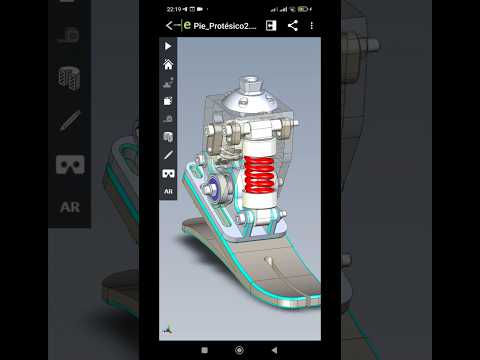
In the fast-paced world of engineering and 3D design, the ability to share and review complex CAD data efficiently is a competitive advantage. For years, designers struggled with the bulky nature of native project files, often finding it difficult to communicate their vision to clients or stakeholders who lacked specialized software. This is exactly where eDrawings changes the game, providing a streamlined, high-performance solution for 3D model visualization.
Seamless Collaboration and Communication
The primary strength of this tool lies in its ability to bridge the gap between the design office and the end user. By utilizing eDrawings, users can transform heavy 3D assemblies into lightweight, email-friendly files that retain all the necessary detail for a thorough review. This eliminates the "technical barrier" that often exists during the feedback loop, allowing project managers and clients to rotate, hide, and explode components within a design without needing a full CAD license.
Beyond simple viewing, the software provides a robust suite of markup tools. Team members can add comments, dimensions, and annotations directly onto the 3D model. This ensures that every piece of feedback is contextual and precise, significantly reducing the risk of manufacturing errors or design misunderstandings.
Mobility and Innovation in the Field
In today’s mobile-first environment, portability is no longer optional. The mobile version of the application allows engineers to take their work out of the office and onto the shop floor or to a client site. Having your 3D models accessible on a smartphone or tablet means you can provide real-time solutions and demonstrations whenever inspiration strikes.
Furthermore, eDrawings has embraced the future by integrating Augmented Reality (AR) and Virtual Reality (VR) capabilities. This allows users to "place" their digital models in a physical room, providing a sense of scale and presence that a traditional computer screen simply cannot match. Whether you are checking for spatial interference or presenting a new product concept, these immersive features provide a layer of clarity that was once impossible.
Conclusion
Whether you are a seasoned SolidWorks veteran or a project stakeholder, mastering this visualization tool is key to a modern workflow. It’s more than just a file viewer; it is a communication powerhouse that ensures your designs are seen, understood, and approved faster than ever before. If you haven't integrated it into your daily routine yet, now is the perfect time to experience the power of simplified 3D sharing.


