
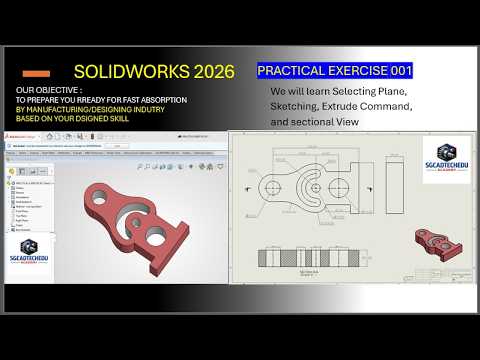
Mastering 3D modeling starts with understanding the fundamental relationship between a flat design and a physical object. For many beginners, the most challenging part of learning CAD software is the transition from a conceptual blueprint to a digital prototype. In this tutorial, we will walk through a practical exercise designed to help you bridge that gap by using a professional workflow.
Understanding the Blueprint
Every great 3D model begins with a detailed SolidWorks 2D drawing. This drawing serves as your roadmap, providing all the necessary dimensions, tolerances, and geometric constraints required to ensure the final part is accurate. Before you start clicking tools in the software, take a moment to analyze the views—usually the front, top, and side views—to determine which feature is the best starting point for your sketch.
Step-by-Step Modeling Process
The key to efficient modeling is "Feature-Based Design." For this exercise, we follow a simple three-step approach:
- Select the Base Plane: Based on your SolidWorks 2D drawing, choose the plane (Front, Top, or Right) that allows you to capture the most complex profile of the part in a single sketch.
- Sketching and Dimensioning: Use the Line, Circle, and Rectangle tools to replicate the geometry seen in the drawing. It is crucial to apply "Smart Dimensions" to fully define your sketch, turning the lines from blue to black. This ensures your model remains stable during future edits.
- Extrusion and Finishing: Once your sketch is closed and defined, use the "Extruded Boss/Base" feature to give the part thickness. From there, you can add secondary features like holes, fillets, or chamfers as specified in the original engineering requirements.
Tips for Beginner Success
Accuracy is more important than speed when you are just starting. Always double-check your units (MMGS or IPS) before you begin sketching to match the SolidWorks 2D drawing you are working from. Additionally, try to keep your sketches simple; it is often better to have several simple features than one overly complicated sketch that is difficult to troubleshoot later.
Conclusion
Consistent practice is the only way to become proficient in 3D modeling. By taking the time to manually recreate mechanical parts from 2D specifications, you develop an "engineering eye" that will serve you throughout your career. Stay tuned for our next exercise as we tackle more complex geometries and advanced features!


