
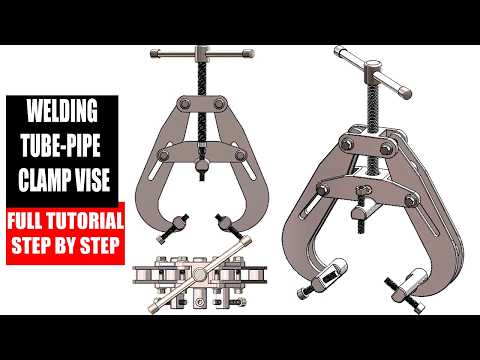
In the competitive world of mechanical engineering and industrial fabrication, the ability to design precise, functional fixtures is a prerequisite for success. Our latest deep dive, Project 48, focuses on a critical workshop tool: the Tube-Pipe Welding Clamp Vise. This comprehensive tutorial provides a step-by-step walkthrough for creating a robust clamping mechanism, perfect for anyone looking to sharpen their CAD skills.
Bridging Mechanical Design and Industrial Tooling
At first glance, a welding clamp might seem worlds apart from complex tooling. However, the foundational principles used to create this vise—such as part mating, tolerance analysis, and geometric stability—are the exact same pillars required for professional SolidWorks 3D mold design. By mastering the assembly of a tube-pipe clamp, designers develop the spatial awareness and technical proficiency necessary to handle the intricate parting lines and core-cavity separations found in advanced industrial projects.
What You Will Learn in Project 48
This tutorial is designed to take you through the entire lifecycle of a project, from a blank canvas to a completed assembly ready for the shop floor. Key highlights include:
- Component Modeling: Learn how to create the base, movable jaws, and screw handles with precise dimensions.
- Assembly Mastery: Discover how to use advanced mates to ensure the vise functions realistically, simulating the physical pressure applied during the welding process.
- Technical Drawing Generation: Convert your 3D models into professional 2D drawings, a crucial step for manufacturing and quality control.
The attention to detail required to ensure the jaw plates align perfectly is a fantastic exercise for those aiming to excel in SolidWorks 3D mold design. In both disciplines, even a fraction of a millimeter can be the difference between a successful product and a costly error.
Why This Project Matters
Whether you are a student building your portfolio or a professional engineer looking to refine your workflow, Project 48 offers practical insights into the CAD world. The skills showcased here, such as managing complex assemblies and creating manufacturing-ready documentation, translate directly into high-level tasks like SolidWorks 3D mold design.
By completing this tutorial, you aren't just learning how to build a clamp; you are learning how to think like a designer who can tackle the most demanding engineering challenges. Dive into the tutorial today and elevate your 3D modeling expertise to the next level!


