
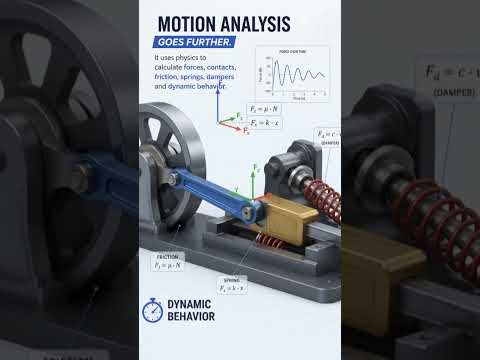
When designing complex mechanical assemblies in SolidWorks, understanding how your components move is crucial for validating your engineering projects. However, many designers get confused when choosing between Motion Study and Motion Analysis. While both tools deal with movement, they serve entirely different purposes and offer varying levels of technical depth.
Here is a complete breakdown of the key differences to help you choose the right tool for your next design.
What is a Motion Study? (Visualizing Motion)
A Motion Study is primarily used for visualization and simple animation. If your main goal is to see how parts fit together, check basic spatial clearances, or create dynamic visual presentations for clients, a Motion Study is the ideal choice.
Key features include: - Visual Animations: Rotate, explode, or collapse components using simple timeline keyframes. - Basic Motors: Apply basic speed and directional controls to see components in motion. - No Physical Forces: It ignores real-world physics such as mass, friction, gravity, and contact forces.
Because it doesn't calculate complex physics equations, rendering a Motion Study is fast and lightweight, making it perfect for marketing materials or quick design reviews.
What is Motion Analysis? (Simulating Physics & Dynamics)
Motion Analysis goes far beyond simple visual tricks. It is a powerful, physics-based simulation tool integrated within SolidWorks that accounts for real-world mechanical forces and material properties.
Key features include: - Physics-Based Calculations: Evaluates gravity, inertia, friction, springs, dampers, and contact forces between parts. - Quantitative Data: Provides precise numerical data, including velocity, acceleration, torque requirements, and power consumption. - FEA Integration: Allows you to transfer dynamic loads directly into structural simulation tools to calculate stress and strain during motion.
If you need to size a motor, evaluate structural loads under motion, or analyze complex mechanism dynamics, Motion Analysis is the tool you need.
Final Verdict: Which One Do You Need?
Choosing the right motion tool in SolidWorks ultimately depends on your project goals: - Use Motion Study when you need quick, attractive visual animations to demonstrate how an assembly operates without needing dynamic force calculations. - Use Motion Analysis when engineering accuracy matters, such as calculating required motor torque, determining reaction forces, or simulating realistic physical behaviors.
By leveraging both features appropriately, you can streamline your design verification process and build better mechanical products faster.


