
Stepping into the world of 3D computer-aided design (CAD) can feel overwhelming, especially when opening a powerful software program for the very first time. However, mastering the SolidWorks interface is much simpler than it looks once you understand its layout and core components. Whether you are an aspiring engineer, industrial designer, or 3D printing enthusiast, gaining confidence with the workspace is your first critical step toward turning creative concepts into precise 3D models.
Key Components of the Interface
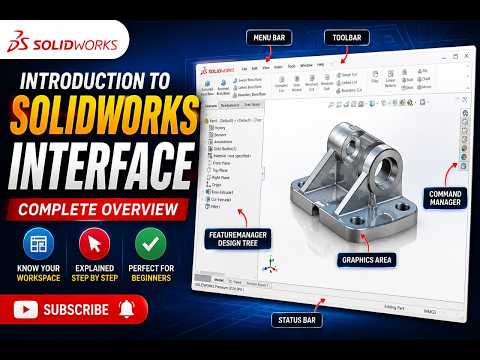
When you start a new part document, the screen is organized into several key functional areas designed to streamline your modeling workflow:
- The Graphics Area: This large central space is your main canvas where your 3D models, 2D sketches, and complex assemblies come to life.
- The CommandManager: Located at the top of the screen, this tabbed toolbar gives you one-click access to essential features, sketching tools, and measurement utilities.
- The FeatureManager Design Tree: Positioned on the left side, this dynamic outline records the complete build history of your project. It lists every sketch, feature, plane, and material assignment in chronological order.
- The View (Heads-Up) Toolbar: Floating directly above the graphics area, this toolbar provides quick shortcuts to adjust view orientations, zoom levels, section views, and display styles.
Navigating the Workspace Efficiently
Smooth navigation in SolidWorks relies heavily on mastering your mouse controls. Pressing and holding the middle mouse button allows you to rotate your model freely in 3D space. Holding the Control key while dragging with the middle mouse button allows you to pan across your screen.
Additionally, you can press the 'S' key on your keyboard to bring up a customizable shortcut menu directly next to your cursor, keeping your most frequently used tools right at your fingertips and significantly speeding up your workflow.
Conclusion
Familiarizing yourself with these foundational tools and layout panels is the key to building speed and confidence in digital modeling. Spend some time clicking through the tabs, rotating objects in the graphics space, and exploring the CommandManager. With a solid grasp of the SolidWorks interface, you are fully prepared to start creating your very first 2D sketches and extruding them into 3D geometry.


