
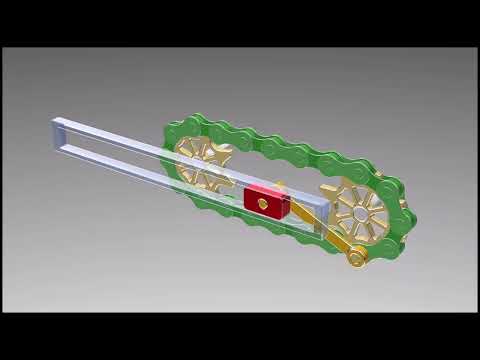
Chain drive mechanisms are essential components in mechanical engineering, widely used for power transmission across various industries. From simple bicycles to complex manufacturing machinery, these systems reliably transfer rotational energy between parallel shafts. For engineering students, designers, and mechanical enthusiasts, mastering the creation of dynamic mechanical assemblies in SolidWorks is a crucial skill for modern product design.
What is a Chain Drive Mechanism?
A chain drive consists of an endless continuous chain meshed with two or more toothed wheels known as sprockets. Unlike belt drives, chain drives operate without slipping, making them ideal for high-torque applications where precise velocity ratios are necessary. They offer high efficiency, durability, and the flexibility to bridge both short and long distances between shafts.
Key Steps to Modeling a Chain Drive
Designing an interactive, realistic chain drive assembly requires a structured 3D modeling approach. Here is how the process generally unfolds:
- Designing the Sprockets: Define the pitch diameter, tooth profile, and center bore using accurate mechanical dimensions to ensure smooth teeth engagement.
- Creating the Chain Path: Sketch a continuous 2D motion path connecting the pitch circles of the sprockets. This path acts as the trajectory along which the individual chain links travel.
- Patterning the Links: Utilizing specialized assembly features in SolidWorks, such as the Chain Component Pattern tool, allows you to link inner and outer chain plates seamlessly along your sketch path.
- Simulating Motion: Applying mechanical mates enables realistic movement, ensuring that rotating the driving sprocket moves the chain and driven sprocket accurately.
Why Use 3D CAD Simulation?
Building a virtual model before physical prototyping saves time and reduces costly manufacturing errors. Advanced modeling software like SolidWorks provides realistic dynamic motion analysis, allowing engineers to test clearance, check for physical interference, and evaluate load distribution prior to production.
Whether you are building industrial machinery or sharpening your CAD modeling skills, understanding how to construct and simulate a functional chain drive will elevate your engineering design portfolio. Download the model files today to study the geometry, assembly mates, and motion setup firsthand!


