
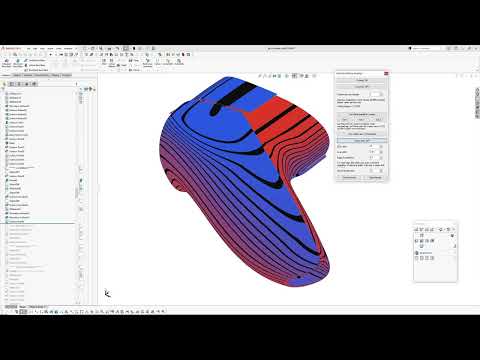
When it comes to advanced 3D CAD modeling, achieving smooth, continuous surfaces is crucial for both aesthetic appeal and engineering functionality. While SolidWorks is an industry standard for parametric design, complex surface analysis often demands richer visual feedback. To bridge this gap, a dedicated surface analysis add-in is currently under development, promising to bring powerful diagnostic tools directly into your primary workspace.
Emulating Rhino Isoparm Displays
One of the stand-out features highlighted in the latest development update is the ability to display surface isoparms. Designers familiar with software like Rhinoceros (Rhino) rely heavily on isoparm visualization to inspect surface flow, patch structures, and underlying curvature.
By bringing this functionality directly into SolidWorks, modelers can evaluate complex geometry with unprecedented visual clarity. This feature allows engineers to detect surface irregularities early in the design process, eliminating the need to constantly export geometry to third-party tools for basic inspection.
Intuitive Surface Normal Direction Indicators
Another major addition to the add-in is the visual display of surface normal directions. Accurately determining face orientation is critical for downstream tasks such as mold design, toolpath generation, and surface offsets.
The add-in introduces a clear "hair" display that projects normal vectors directly from the surface using precise parametric evaluations (such as 0.5/0.5 UV positioning). This intuitive visual cue gives designers instant confirmation of surface directions, ensuring seamless patch continuity across complex assemblies.
Looking Ahead
This development update marks an exciting step forward for CAD professionals seeking enhanced control over surface diagnostics. By incorporating features like Rhino-style isoparm visualization and precise normal direction indicators, this add-in promises to streamline advanced SolidWorks surfacing workflows. Stay tuned for future progress updates as development continues!


