
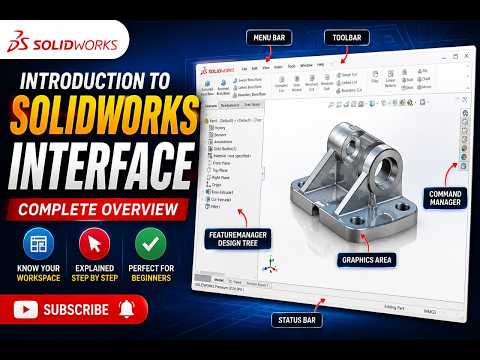
Stepping into the world of 3D computer-aided design (CAD) can feel overwhelming, but mastering the SolidWorks interface is the first crucial step toward transforming your creative concepts into precise 3D models. Whether you are an aspiring engineer, product designer, or hobbyist, understanding where tools are located and how to navigate the software will dramatically speed up your design workflow.
In this beginner's guide, we will break down the fundamental elements of the user interface so you can start designing with confidence.
Key Components of the User Interface
When you open SolidWorks for the first time, you are greeted by a well-organized workspace designed to streamline your modeling process. Here are the core areas you need to know:
- The CommandManager: Located at the top of the screen, this tabbed toolbar gives you quick access to essential features, such as Sketching, Features, and Evaluate tools.
- The FeatureManager Design Tree: Positioned on the left side, this outline displays the chronological history of your project. It allows you to edit past operations, adjust dimensions, and manage your design hierarchy effortlessly.
- The Graphics Area: This large central space is your primary digital canvas where you visualize, manipulate, and build your 3D parts and assemblies.
- The Heads-Up View Toolbar: Floating at the top of the Graphics Area, this handy toolbar offers quick controls for zoom levels, view orientations, display styles, and section views.
Navigating the Workspace Efficiently
To work smoothly, getting comfortable with standard mouse controls is essential. Rotating your 3D view is as simple as holding down the middle mouse button and dragging. Holding the Shift key while dragging the middle mouse button allows you to zoom in and out smoothly, while holding Ctrl lets you pan across the Graphics Area.
Start Building Your Skills Today
Mastering a new CAD application takes practice, but breaking down the layout makes the learning curve far less intimidating. By familiarizing yourself with these foundational workspace elements, you lay a strong foundation for your future projects in SolidWorks. Practice exploring each panel, and get ready to dive into creating your first 2D sketches!


