
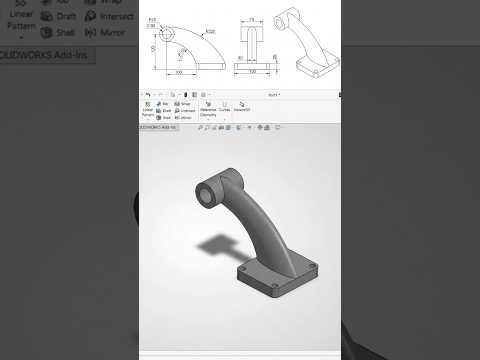
In the world of mechanical design, the ability to translate a flat concept into a functional 3D component is a vital skill. For those participating in the 100 CAD Model Challenge, Model #069—the Offset Shaft Support—presents a unique opportunity to refine your workflow. While the process often begins with precise SolidWorks 2D drafting, the true magic happens when you leverage advanced features like the Boundary Boss tool to create complex, smooth transitions.
Why the Offset Shaft Support Matters
The Offset Shaft Support is more than just a practice part; it is a lesson in alignment and structural integrity. Modeling this component requires a deep understanding of how different profiles interact across a workspace. By starting with a strong foundation in SolidWorks 2D drafting, you ensure that every dimension and constraint is perfectly set before you ever attempt to generate volume. This accuracy is what separates hobbyist designs from professional-grade engineering.
Harnessing the Power of the Boundary Boss
One of the most powerful features in the SolidWorks arsenal is the Boundary Boss/Base tool. Unlike a standard loft, the Boundary Boss provides a higher degree of control over the tangency and curvature of the surfaces connecting your sketches.
When modeling the Offset Shaft Support, you aren't just connecting two shapes; you are defining the flow of material. By selecting your profiles and applying the necessary constraints, you can create a support structure that is both aesthetically pleasing and mechanically sound. This tool is essential for designers who want to move beyond basic extrusions and explore more organic, optimized geometries.
Streamlining Your Workflow
To master this model, follow these key steps: 1. Layout Your Sketches: Begin with accurate SolidWorks 2D drafting on multiple planes to define the base and the offset support head. 2. Define Guide Curves: If the transition requires a specific path, use guide curves to dictate the flow of the Boundary Boss. 3. Apply the Boundary Boss: Select your profiles in order and adjust the start/end constraints to ensure a smooth transition. 4. Finalize Details: Add fillets and mounting holes to complete the functional design.
Whether you are a student or a seasoned professional, practicing these techniques ensures you stay sharp. Mastering tools like the Boundary Boss allows you to take even the most complex 2D drafts and turn them into manufacturing-ready 3D models with ease.


